![Full Color.png]](https://learn.tryswivl.com/hs-fs/hubfs/Full%20Color.png?height=50&name=Full%20Color.png)
Sequences in swivl let you automate outreach via SMS and email when specific actions or milestones occur in your Facility Management Software (FMS). You can use sequences to engage with leads, request reviews, send reminders, or follow up on missed payments.
How to Set Up a Sequence
- Go to Settings > Sequences.
- Click + Add Sequence.
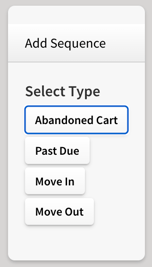
- Choose the type of sequence you want to create:
- Move-In
- Move-Out
- Abandoned Cart
- Past Due
4. Click the Add button next to each instance where you want swivl to send a message.
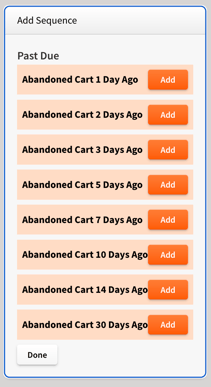
💡 Each Sequence “instance” refers to a specific timing or condition under which a message will be sent (e.g., 1 day after move-in).
Customize Your Messages
After adding your sequence instances, customize the messages by following these steps:
-
Navigate to Property Manager > Cortex.
-
Scroll to the Sequences tab and select the sequence you added (e.g., Move-Outs).
-
You’ll see a list of the instances you created in Settings. For each one, you can customize:
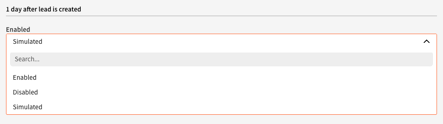
a. Status:
-
Enabled: Sequences are active and messages are being delivered to tenants.
-
Disabled: Sequences are inactive, and messages are not being delivered.
-
Simulated: swivl does not send sequences to tenants but still pulls tenant records from your FMS to show who would receive each message. This is useful for testing.
-
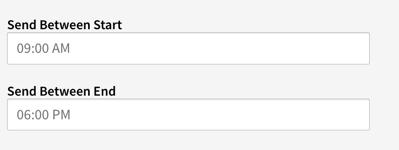
Set when messages should go out.
State-Specific Quiet Hours Enforcement
In addition to TCPA rules, Compliance Toolkit automatically enforces state-specific quiet hours in certain states. This helps ensure that non-essential messages aren’t delivered during restricted time periods.
Quiet hours are applied based on the recipient’s location — determined by either the phone number’s area code (default) or the location shared via the Contact API. Messages that fall within these hours are automatically rescheduled and sent once quiet hours end.
⚠️ Note:
Some states have extra requirements, such as prohibiting non-essential messages or using different weekend quiet hours. Compliance Toolkit enforces only what’s listed in the table below. When using Twilio Services, please consult your legal counsel to confirm any additional compliance needs.
| State(s) | Quiet Hours Enforced (Local Time) |
|---|---|
| Alabama | 8:00 PM – 8:00 AM |
| Connecticut | 8:00 PM – 9:00 AM |
| Florida | 8:00 PM – 8:00 AM |
| Louisiana | 8:00 PM – 8:00 AM |
| Maryland | 8:00 PM – 8:00 AM |
| Mississippi | 8:00 PM – 8:00 AM |
| Oklahoma | 8:00 PM – 8:00 AM |
| Tennessee | 8:00 PM – 8:00 AM |
| Texas | 9:00 PM – 8:00 AM |
| Washington | 8:00 PM – 8:00 AM |
-
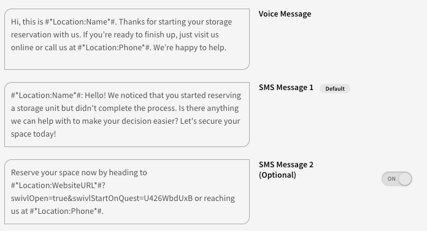
- Channel: Choose how you’d like the message to be sent — SMS, Email, or Both.
If you’re on our Disruptor tier, you’ll also have access to the Voice channel, which lets swivl handle outbound collection calls automatically.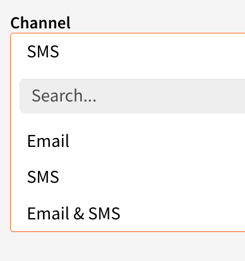
- Channel: Choose how you’d like the message to be sent — SMS, Email, or Both.
ℹ️ The Voice channel for Abandoned Cart and Past Due sequences is available exclusively for Disruptor Tier accounts. If you'd like to learn more, please contact support@tryswivl.com
d. Content: Edit the text message. For emails, you can preview the templates used.