![Full Color.png]](https://learn.tryswivl.com/hs-fs/hubfs/Full%20Color.png?height=50&name=Full%20Color.png)
To enable swivl’s payment & discount functionality within StorEdge, specific API permissions must be granted. Follow the steps below to update your API settings at the corporate level.
Steps to Update API Permissions in StorEdge
- Click the Storable logo in the upper-left corner of StorEdge.
- Click the Corporate Level button.
- Click the Settings (?) icon.
- Select the API button.
- In the search bar, type swivl and click on it.
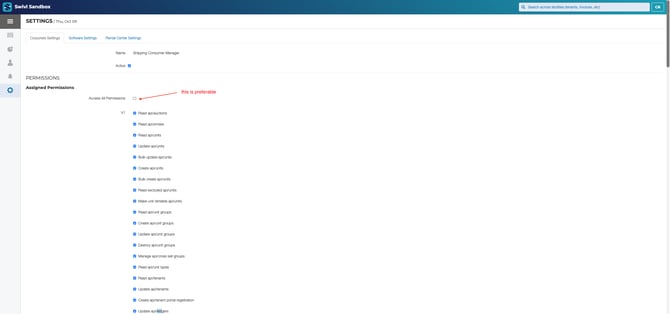
- Review and select the API permissions to grant swivl access:
- Recommended: Grant access to all permissions for full functionality.
- Minimum required if limiting access:
Update api/ledgersManage api/corporate/ledger-
Read api/discount_plans -
Read api/unit_groups
- Click the Update API Association button to save your changes.
Steps to show discounts for swivl in StorEdge
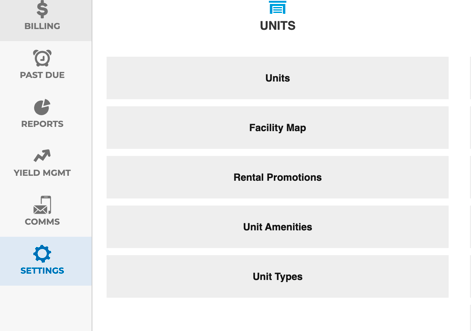
- In the left sidebar, select Settings
- Choose Rental Promotions within the Units section
- Click "Edit Corporate Discount Plans"
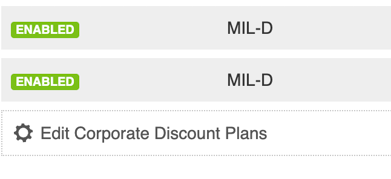
- In actions, click "Edit" near the plan or create a new one
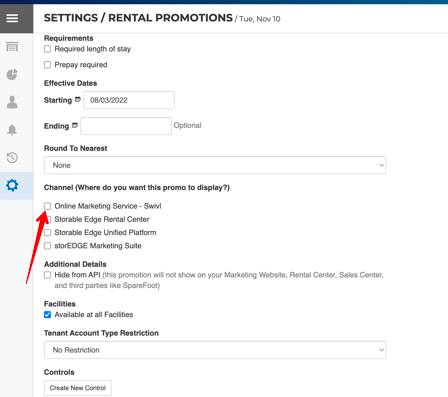
- Within the Channel section, check the box next to "Online Marketing Service - Swivl"