![Full Color.png]](https://learn.tryswivl.com/hs-fs/hubfs/Full%20Color.png?height=50&name=Full%20Color.png)
Offering discounts is a great way to attract and convert new tenants. In swivl, you can easily manage and display a variety of discounts, including Custom, Military, Senior, and more, right from your Property Manager.
To manage your discounts:
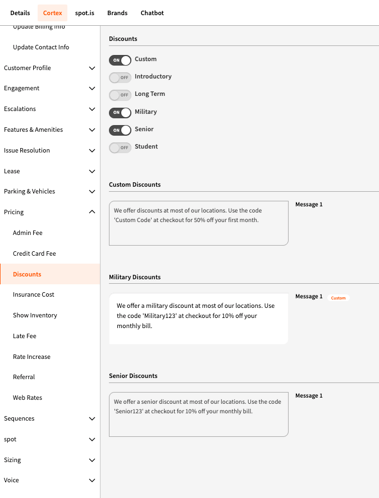
- Choose the organization, group, or individual location where you want to apply discounts.
-
Navigate to the Cortex tab for that selected level.
- Go to Pricing → Discounts in the left-hand menu.
Types of Discounts Available
Choose which discounts you want to offer:
-
Custom
-
Introductory
-
Long Term
-
Military
-
Senior
-
Student
Once a discount is toggled on, a message field (worksheet) will appear below for that specific discount type.
Customizing Your Discount Messages
Each discount comes with default text, but you can fully customize what displays to tenants.
How to customize:
-
Click into the message field (worksheet)
-
Edit the content to reflect your specific offer, discount code, or promotion
-
No need to save - changes apply automatically
💡 Example: “Use code 'Custom50' at checkout for 50% off your first month!”
Syncing with Your FMS
If your FMS already includes special pricing for discounted units:
-
swivl can automatically reflect those changes in your inventory carousel.
-
This ensures tenants see accurate and up-to-date pricing and promotions.