![Full Color.png]](https://learn.tryswivl.com/hs-fs/hubfs/Full%20Color.png?height=50&name=Full%20Color.png)
Here’s a fun little trick with spot.is!
When you’re viewing your spot page on an iPhone or iPad, you can quickly turn it into an app-like experience.
Here’s how:
-
Tap the Share icon (the little square with the arrow).
-
Scroll down and select Add to Home Screen.
-
Tap Add in the top-right corner.
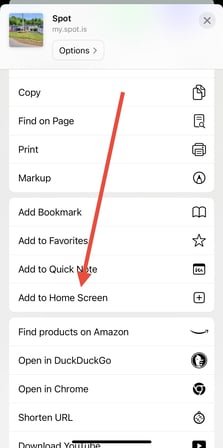
You’ll now see a shiny new spot icon on your home screen! When you open it, it’ll look and feel just like a standalone app!
💡 Make spot easily accessible every day! Encourage your tenants to add it too—they can quickly check account info, pay a bill, access their gate code, chat with your bot, or even leave a review (because happy tenants love to share!).
Saving spot to the home screen is a simple step that makes life easier for both you and your tenants—everything you need is always just a tap away.